Web UI
ChatGPT-like interface for all your LLMs
llms.py includes a modern, fast, and privacy-focused web interface that provides a ChatGPT-like experience for accessing all your local and remote LLMs.
Launch the server and Web UI with:
llms --serve 8000Overview
The UI is built with simplicity and privacy in mind:
- No Build Tools: Uses native ES modules
- No npm Dependencies: Pure JavaScript
- Offline First: Works entirely offline
- Privacy Focused: All data stored locally in SQLite
- Fast & Lightweight: Minimal footprint
Key Features
🎨 Modern Interface
Access all your LLMs through a clean, intuitive interface:
🌙 Dark Mode
Built-in dark mode support that respects your system preference or can be toggled manually:
🔍 Search History
Quickly find past conversations with built-in search:
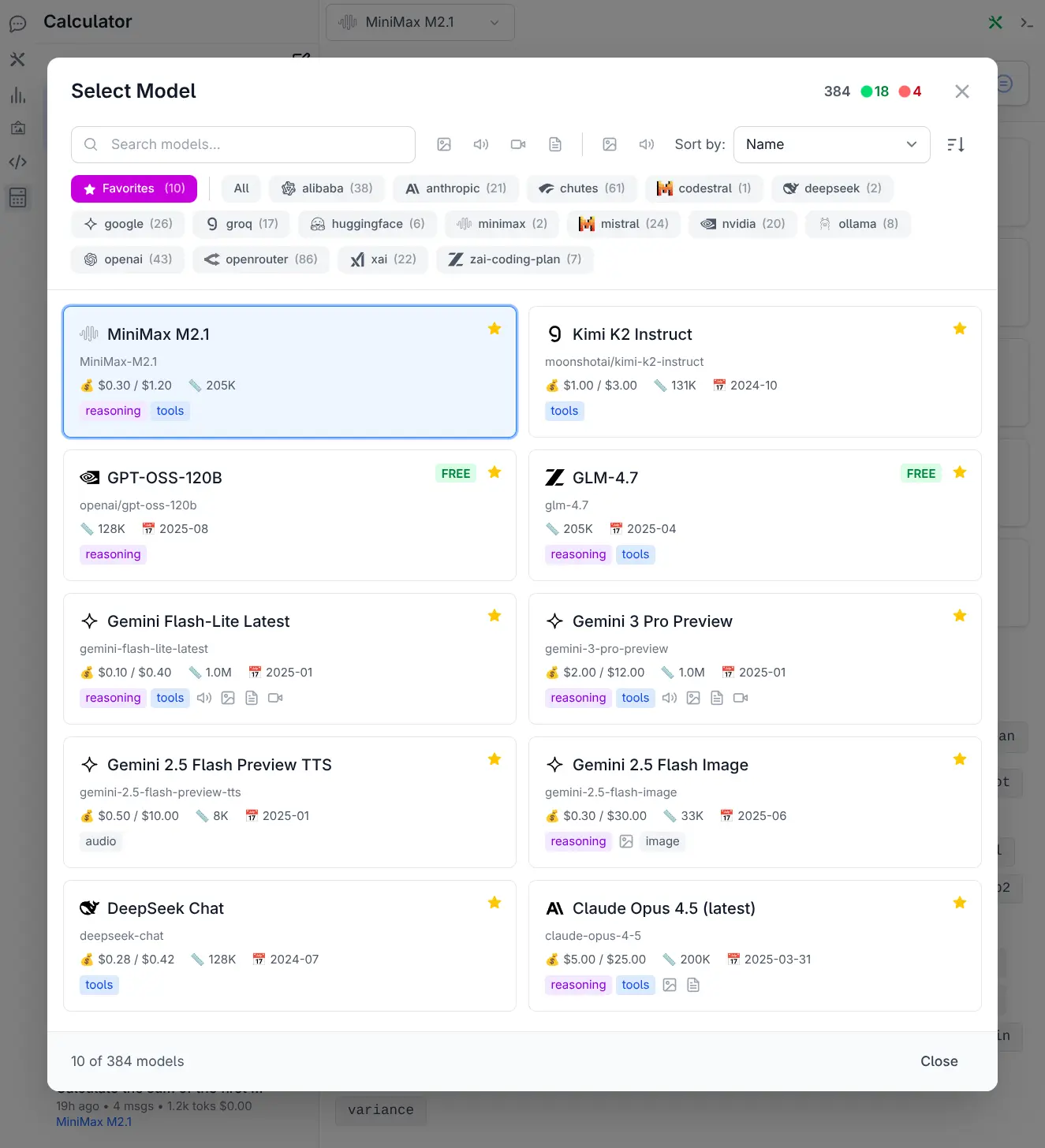
Model Selector UI
With over 530 models from 24 providers now available, discovering and selecting the right model required a complete overhaul. The Model Selector has been completely redesigned as a full-featured dialog offering:
- 🔍 Smart Search & Discovery - Instantly search across model names, IDs, and providers
- 🎯 Advanced Filtering - Filter by name, providers & input and output modalities
- 📊 Flexible Sorting - Sort by Knowledge Cutoff, Release Date, Last Updated & Context
- ⭐ Favorites System - Star model card to add/remove to favorites quick list
- 💎 Rich Model Cards - In depth model overview at a glance
📚 System Prompt Library
Access 200+ professional system prompts for various use cases:
Categories include:
- Technical assistance
- Creative writing
- Data analysis
- Code review
- Translation
- And many more...
See System Prompts docs for more details.
⚙️ Advanced Settings
Fine-tune AI requests with advanced options:
Available parameters:
- Temperature (0-2): Control response randomness
- Max Completion Tokens: Limit response length
- Seed: For deterministic outputs
- Top P (0-1): Nucleus sampling
- Frequency Penalty (-2.0 to 2.0): Reduce repetition
- Presence Penalty (-2.0 to 2.0): Encourage new topics
- Stop Sequences: Control where generation stops
- Reasoning Effort: For reasoning models
- Top Logprobs (0-20): Token probability analysis
🔌 Enable/Disable Providers
Manage which providers are active in real-time:
- Toggle providers on/off
- Providers are tried in order
- Automatic failover if one fails
- See which models are available per provider
Configuration
UI Configuration
Customize the UI via ~/.llms/ui.json:
{
  "prompts": [...],
  "defaultModel": "grok-4-fast",
  "theme": "auto"
}
Server Configuration
Start the server with custom options:
# Basic server
llms --serve 8000

# With verbose logging
llms --serve 8000 --verbose

# Custom root directory for UI files
llms --serve 8000 --root /path/to/ui
Storage
Data primarily stored in SQLite databases:
- Conversations: All chat threads and messages
- Activity Logs: Request history for analytics
- Settings: UI preferences
- User Profile: If using OAuth
Data is tied to the browser origin (http://localhost:PORT), so running on different ports creates separate databases.
Privacy
The UI is designed with privacy as a priority:
- ✅ No external requests (except to configured LLM providers)
- ✅ No tracking or analytics
- ✅ No ads
- ✅ No sign-ups required
- ✅ All data stored locally
- ✅ Works entirely offline (Use local LLMs, Browse History)
- ✅ Open source