Multimodal
File Support
Process and analyze documents, especially PDFs, with capable models
Features
- PDF Processing: Extract text, summarize content
- Data Extraction: Pull specific information from documents
- Document Q&A: Ask questions about document content
- Easy Upload: Drag & drop in the web UI
- Batch Processing: Upload multiple files
Using Documents in CLI
# Summarize using default template
llms --file ./docs/handbook.pdf

# Local PDF with prompt
llms --file ./docs/policy.pdf "Summarize the key changes"

# Remote PDF URL
llms --file https://example.org/whitepaper.pdf "What are the main findings?"

# With specific model
llms -m gpt-5 --file ./policy.pdf "Summarize the key changes"
llms -m gemini-flash-latest --file ./report.pdf "Extract action items"
llms -m qwen2.5vl --file ./manual.pdf "List key sections"

# Combined with system prompt
llms -s "You're a compliance analyst" --file ./policy.pdf "Identify risks"
Using Documents in UI
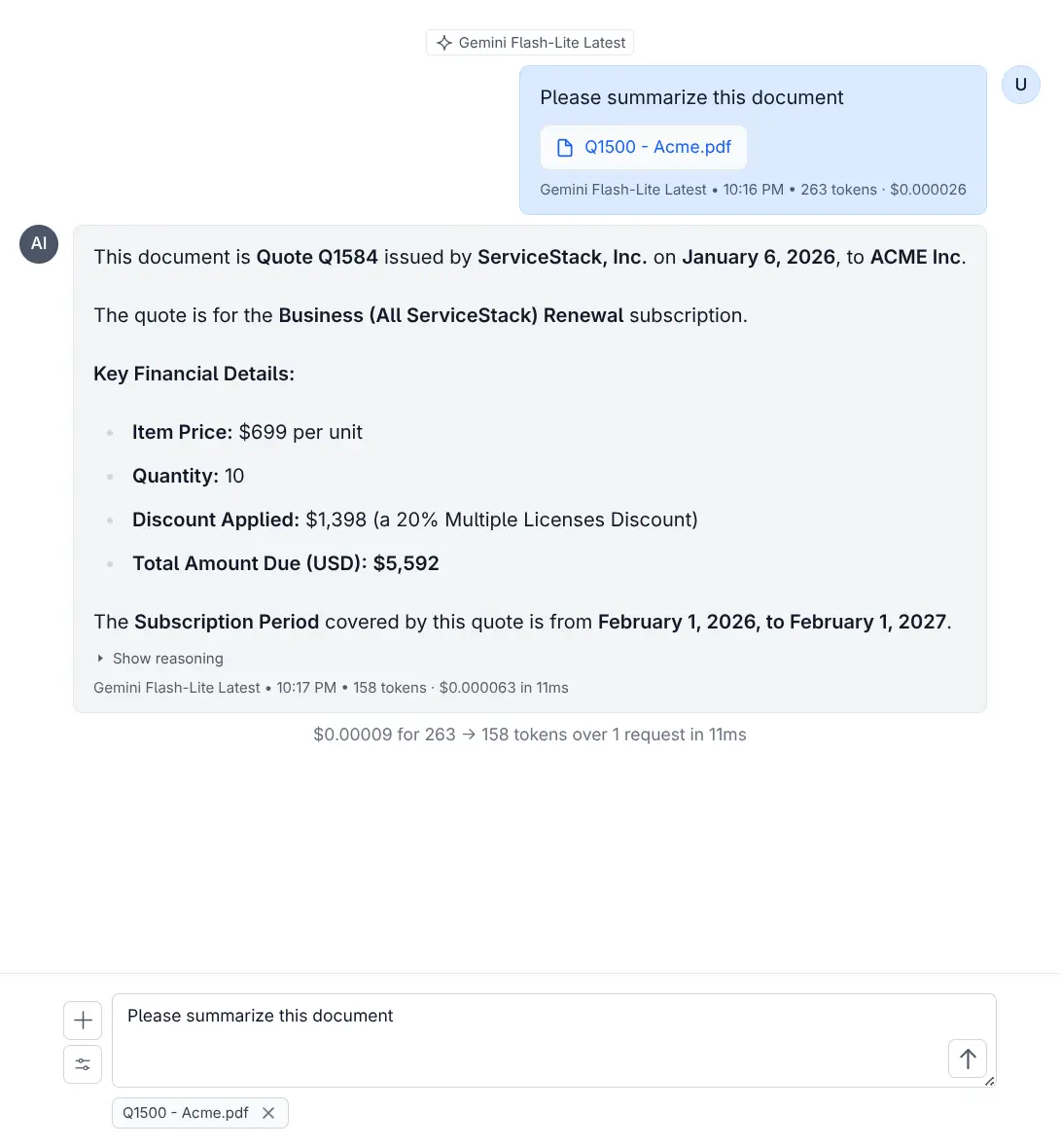
Drag and drop PDFs or other documents into the chat.
Document-Capable Models
Models that support PDF and document processing:
- OpenAI: gpt-5, gpt-5-mini, gpt-4o, gpt-4o-mini
- Google: gemini-flash-latest, gemini-2.5-flash-lite
- Grok: grok-4-fast (via OpenRouter)
- Qwen: qwen2.5vl, qwen3-max, qwen3-vl:235b, qwen3-coder
- Others: kimi-k2, glm-4.5-air, deepseek-v3.1:671b, llama4:400b
Custom File Template
{
  "model": "gpt-5",
  "messages": [
    {
      "role": "user",
      "content": [
        {
          "type": "file",
          "file": {
            "filename": "",
            "file_data": ""
          }
        },
        {
          "type": "text",
          "text": "Please summarize this document"
        }
      ]
    }
  ]
}
llms --chat file-request.json --file ./docs/handbook.pdfUse Cases
- PDF Summarization: Get concise summaries of long documents
- Contract Analysis: Extract key terms from contracts
- Report Analysis: Extract insights from reports
- Research Papers: Summarize academic papers
Tips for Best Results
- PDFs work best with text-based content
- Consider page count and file size
- Some models handle longer documents better
Performance Considerations
- Larger files take longer to process
- Consider using lighter models for simple tasks
- Remote URLs may be slower due to download time