Multimodal
Audio Support
Transcribe and analyze audio files with audio-capable models
Features
- Transcription: Convert speech to text
- Audio Analysis: Summarize meetings, extract topics
- Multiple Formats: MP3, WAV
- Flexible Input: Local files, remote URLs, or base64 data
- Easy Upload: Drag & drop in the web UI
Using Audio in CLI
# Transcribe audio using default template
llms --audio ./recording.mp3

# Local audio file with prompt
llms --audio ./meeting.wav "Summarize this meeting recording"

# Remote audio URL
llms --audio https://example.org/podcast.mp3 "What are the key points?"

# With specific audio model
llms -m gpt-4o-audio-preview --audio interview.mp3 "Extract main topics"

# Combined with system prompt
llms -s "You're a transcription specialist" --audio talk.mp3 "Provide transcript"
Using Audio in UI
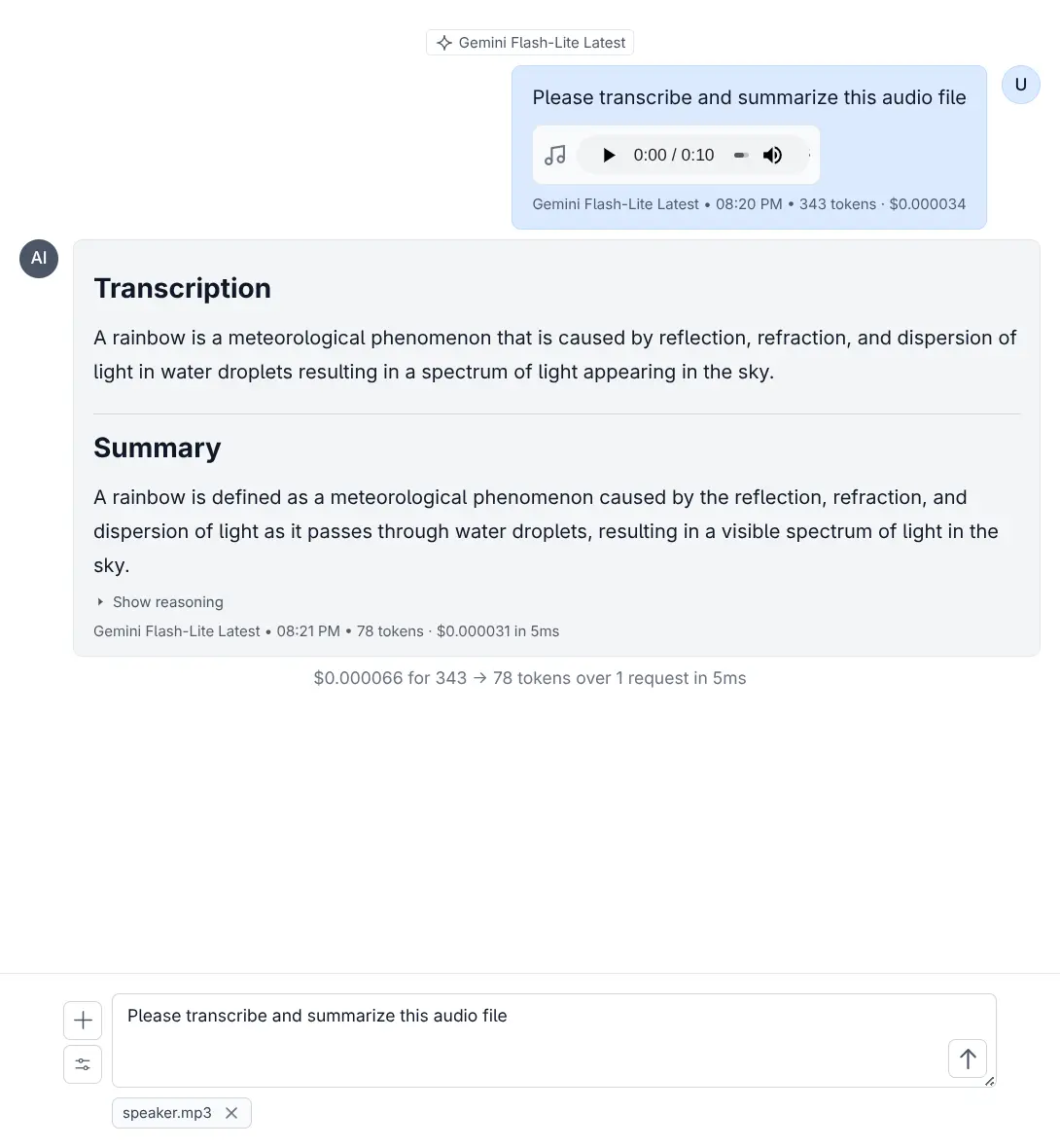
Drag and drop audio files or use the attach button to upload.
Audio-Capable Models
Models that support audio processing:
- OpenAI: gpt-4o-audio-preview
- Google: gemini-2.5-pro, gemini-2.5-flash, gemini-2.5-flash-lite
Custom Audio Template
{
  "model": "gpt-4o-audio-preview",
  "messages": [
    {
      "role": "user",
      "content": [
        {
          "type": "input_audio",
          "input_audio": {
            "data": "",
            "format": "mp3"
          }
        },
        {
          "type": "text",
          "text": "Please transcribe this audio"
        }
      ]
    }
  ]
}
llms --chat audio-request.json --audio speech.wavUse Cases
- Meeting Transcription: Convert meeting recordings to text
- Interview Analysis: Extract key points from interviews
- Podcast Summaries: Summarize podcast episodes
- Voice Notes: Transcribe voice memos
Tips for Best Results
- Use clear audio with minimal background noise
- Consider file size limits
- MP3 is typically smaller than WAV
Performance Considerations
- Larger files take longer to process
- Consider using lighter models for simple tasks
- Remote URLs may be slower due to download time